


J2534 Pass-Thru programming: what it is and how it works
SAE J2534 is a standardized pass-thru interface used to connect vehicle manufacturer programming software to a compatible vehicle communication interface.
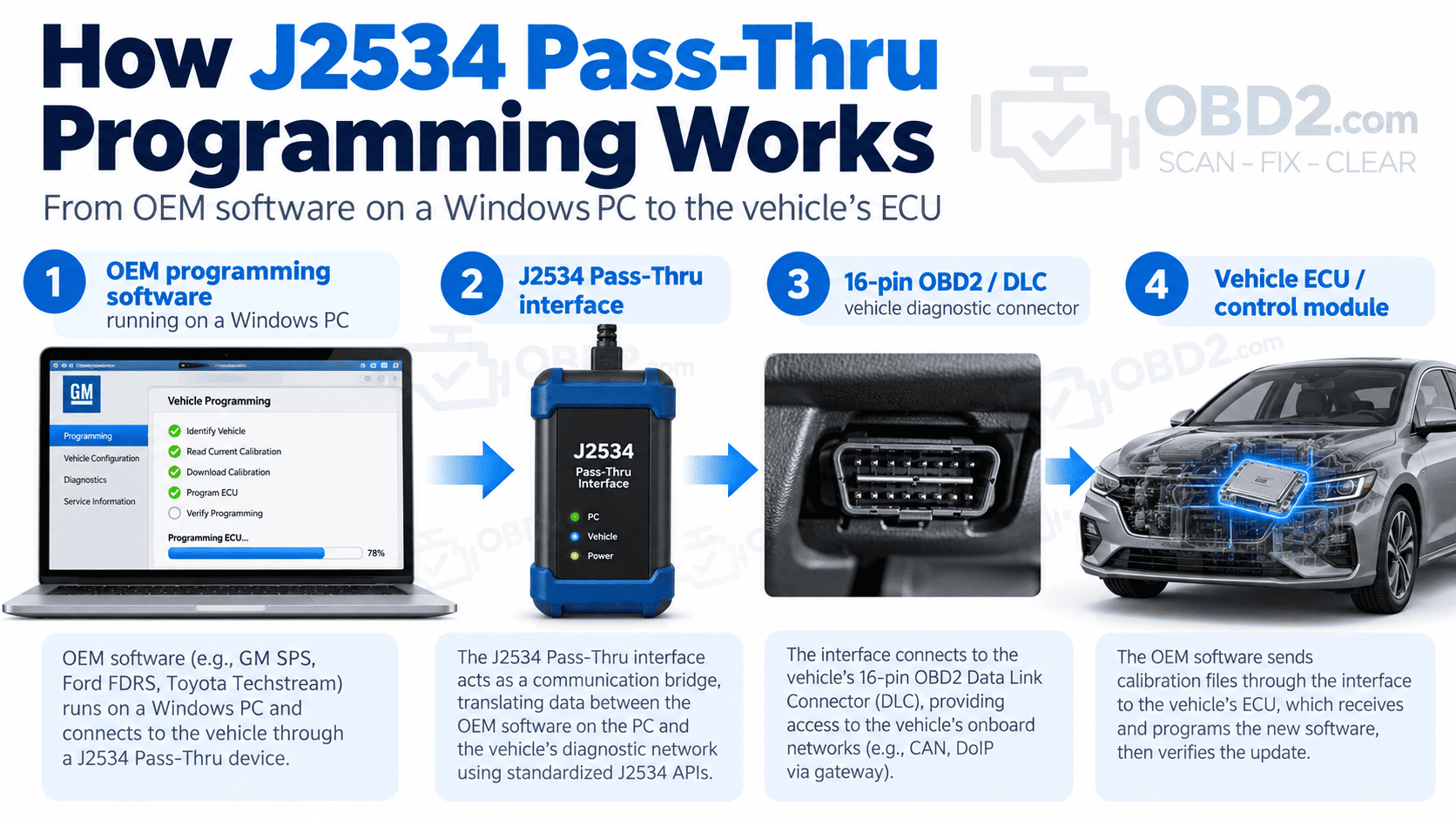
In practical terms, it allows a Windows PC running OEM programming software to communicate with a vehicle through a J2534-compatible device, usually connected to the vehicle’s diagnostic port.
This is why J2534 is often associated with terms such as Pass-Thru programming, ECU reflashing and module programming.
The important point is that the J2534 device does not decide what software should be installed in the vehicle. The manufacturer application controls the programming procedure. The pass-thru interface provides the communication path between the computer and the vehicle.
OEM programming software → Windows PC → J2534 interface → vehicle diagnostic connector → ECU or control module.
Why J2534 exists
Vehicle control modules occasionally need new software or updated calibration data. This can happen when a manufacturer releases an update, when an emission-related module is replaced, or when a specific service procedure requires a module to be programmed.
Without a common interface standard, independent workshops could need completely different programming hardware for every vehicle manufacturer.
J2534 was developed to provide a standardized communication layer between compatible manufacturer software and pass-thru hardware.
That does not make every manufacturer procedure identical. Ford, GM, Chrysler, Toyota and other brands can still use their own applications, subscriptions, authentication systems and programming procedures. What J2534 standardizes is the communication interface between compatible software and hardware.
How J2534 Pass-Thru programming works
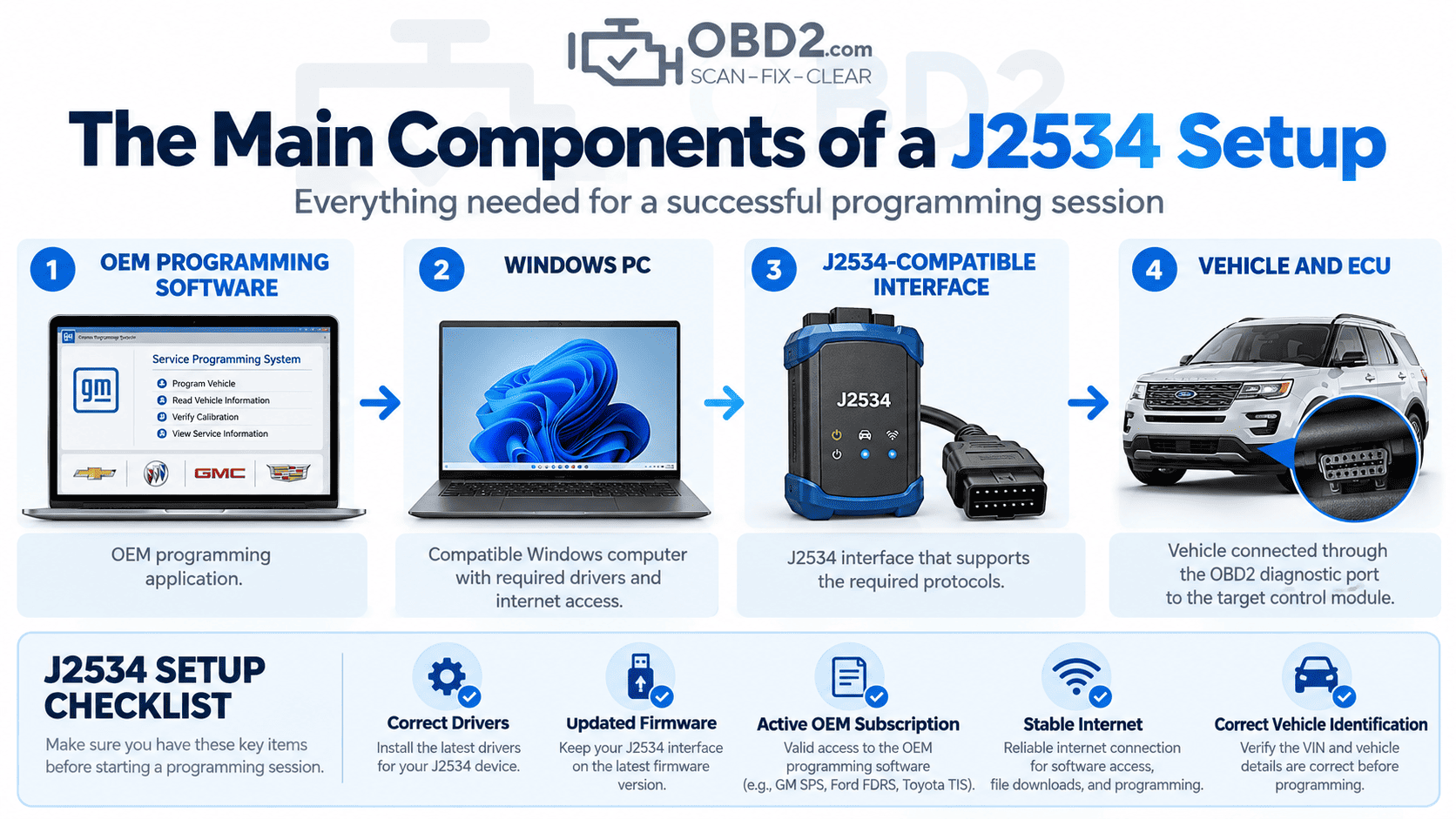
A typical programming setup contains four main parts.
1. Vehicle manufacturer programming software
The programming application is supplied by the vehicle manufacturer or through an authorized service-information platform.
This software normally identifies the vehicle, determines which calibration or software is applicable and controls the programming sequence.
The exact requirements differ between manufacturers. Some systems require a subscription, an online account, internet access or additional security authentication.
2. A compatible Windows PC
The manufacturer application usually runs on a Windows computer.
Operating-system requirements, drivers, browser components, security software and other prerequisites can vary considerably between OEM platforms.
Before attempting a programming session, it is worth checking the manufacturer’s requirements rather than assuming that any Windows laptop will work.
3. A J2534-compatible pass-thru interface
The interface acts as the communication bridge between the PC and the vehicle.
This is an important distinction: a device having an OBD2 connector does not automatically make it a J2534 programming interface.
A suitable device should explicitly state which J2534 specification, communication protocols and manufacturer applications it supports.
4. The vehicle diagnostic connector
On many passenger vehicles, the J2534 interface connects through the familiar 16-pin Data Link Connector.
That connector can carry several different vehicle communication protocols and networks depending on the age and architecture of the vehicle.
For the connector layout itself, see our OBD2 connector and 16-pin DLC pinout guide.
What is J2534 used for?
J2534 is primarily associated with control-module reprogramming.
Depending on the vehicle, manufacturer software and interface capabilities, a J2534 programming session may be used for operations such as:
- installing updated ECU calibration software;
- reprogramming emission-related control modules;
- applying manufacturer software updates;
- programming certain replacement modules;
- performing manufacturer-defined reflash procedures.
The actual functions available are determined by the vehicle manufacturer.
For example, having a J2534-compatible interface does not automatically mean that every module in every vehicle can be programmed. The OEM application, vehicle model, model year, module type, security requirements and interface capabilities all matter.
J2534 programming is not the same as normal OBD2 diagnostics
An ordinary OBD2 scanner is mainly used to retrieve diagnostic information.
Typical scan-tool functions include:
- reading diagnostic trouble codes;
- clearing fault codes;
- viewing live data;
- checking readiness monitors;
- performing supported service functions.
A J2534 pass-thru interface has a different purpose. It allows compatible manufacturer software to communicate with a vehicle during programming.
Some professional diagnostic tools combine both capabilities. They can operate as a multi-system scanner during normal diagnosis and also provide a J2534 pass-thru mode for manufacturer programming software.
Those are still two separate functions.
J2534-1 vs J2534-2
J2534-1 defines the core pass-thru requirements associated with vehicle reprogramming, particularly for emission-related applications.
J2534-2 adds extended features that can support additional communication functions and applications beyond the basic J2534-1 scope.
This distinction matters when choosing an interface.
A product advertised simply as “J2534 compatible” may support the core J2534-1 functions without implementing every optional or extended feature.
Compatibility should therefore be checked for the specific manufacturer, vehicle and operation you intend to perform.
What you need before starting a J2534 programming session
A typical setup may require:
- a compatible J2534 interface;
- a suitable Windows PC;
- the correct J2534 drivers;
- up-to-date interface firmware;
- manufacturer programming software;
- access or a subscription to the manufacturer’s service platform;
- internet access where required;
- a stable vehicle power supply;
- the correct vehicle identification and calibration information.
Programming is one of those jobs where preparation matters more than speed.
If the manufacturer application, drivers or subscription are not ready before the vehicle is connected, it is better to resolve that first than to start a programming session and discover a problem halfway through.
Why stable battery voltage matters
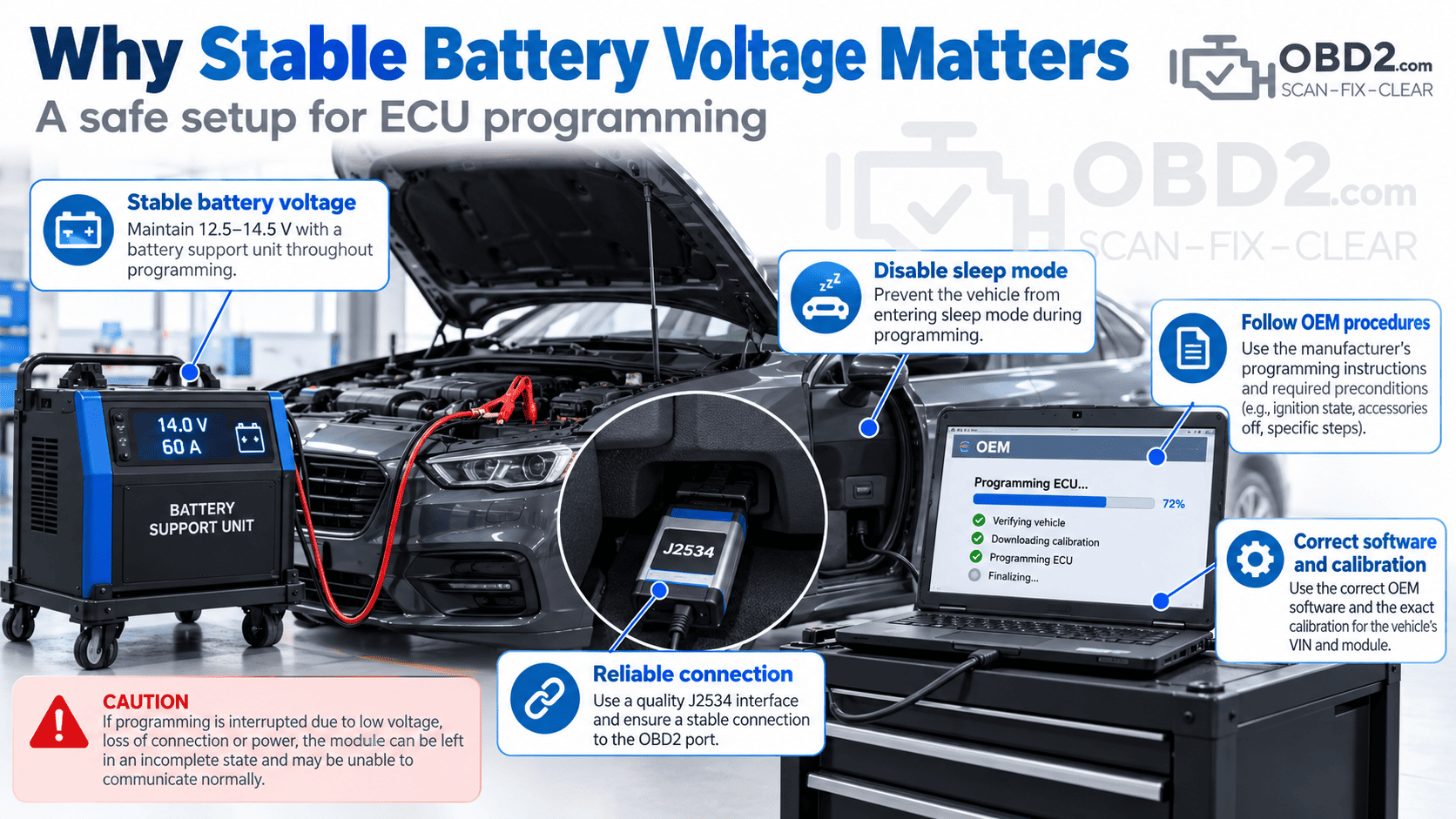
One of the most important parts of ECU programming is maintaining a stable vehicle power supply.
A programming operation may take several minutes or longer. During that time the ignition may be on, control modules may remain awake and the vehicle can draw significantly more current than it would when parked normally.
If the battery voltage drops too far while software is being written to a control module, the programming process can fail.
In some cases, restarting the procedure may be enough to recover the module. In others, the module may stop communicating normally and require a recovery procedure.
Professional programming work therefore commonly uses an appropriate stabilized battery support unit rather than relying on an ageing vehicle battery or a basic charger.
Can any J2534 tool program any vehicle?
No.
J2534 standardizes the communication interface, but it does not make every tool universally compatible with every vehicle.
Compatibility can depend on:
- the J2534 version implemented by the interface;
- supported communication protocols;
- interface firmware;
- Windows drivers;
- manufacturer software requirements;
- vehicle make, model and year;
- the module being programmed;
- manufacturer security and authentication requirements.
Two interfaces can both advertise J2534 support and still have very different manufacturer compatibility.
This is why the useful question is not simply “Does this device support J2534?” but rather:
“Is this interface supported for the exact OEM software, vehicle and programming procedure I need?”
Programming, coding and configuration are not the same thing
These terms are often used interchangeably, but they describe different operations.
Programming or flashing generally means writing software or calibration data into a control module.
Coding or configuration generally means setting module options, vehicle-specific parameters or configuration data.
A J2534 interface provides communication capability. It does not determine which coding or configuration functions are available.
If an OEM application supports a particular procedure through J2534, the interface may be able to carry out the required communication. If the manufacturer application does not offer that function, J2534 compatibility alone does not create it.
Does J2534 work through the OBD2 port?
On many passenger vehicles, yes.
The pass-thru device normally connects through the vehicle’s diagnostic connector, but that does not mean every programming operation is simply “OBD2 programming.”
The same 16-pin connector can provide access to several vehicle networks and manufacturer-specific diagnostic services.
Modern vehicles may also include central gateways, security gateways, multiple CAN networks and newer communication protocols.
The physical connector is only the access point. The actual communication path behind it depends on the vehicle architecture.
Modern vehicle security and J2534
Vehicle security has become an increasingly important part of programming and advanced diagnostics.
Some newer vehicles use authenticated diagnostic sessions, security gateways, manufacturer accounts or other authorization systems before certain operations are allowed.
A J2534-compatible interface does not automatically bypass these protections.
Where authorization is required, the technician must use the manufacturer’s approved access process.
Common J2534 programming problems
When a programming session fails, the cause is not always the vehicle or the ECU itself.
The J2534 interface is not detected
Check:
- USB, Ethernet or wireless connection where applicable;
- J2534 drivers;
- interface firmware;
- Windows device detection;
- manufacturer software interface selection.
The interface is detected but the vehicle will not communicate
Check:
- DLC power and ground;
- vehicle battery voltage;
- correct ignition state;
- interface compatibility;
- vehicle network condition;
- manufacturer security requirements.
If the scan tool itself cannot communicate with the vehicle, the problem should normally be diagnosed before attempting programming.
Programming starts but stops partway through
Possible causes include:
- unstable vehicle voltage;
- PC entering sleep or power-saving mode;
- USB or network disconnection;
- incorrect software or calibration selection;
- interface or driver incompatibility;
- loss of internet connection where required;
- manufacturer server or authentication problems.
What happens if ECU programming is interrupted?
The result depends on the control module and the point at which the interruption occurs.
Some modules can simply restart the programming sequence. Others may enter a recovery or boot mode that requires a manufacturer-specific procedure.
In the worst case, the control unit may no longer communicate normally and could require specialist recovery or replacement.
This is why programming should never be approached in the same way as clearing a fault code.
A failed code-clear request is usually an inconvenience. A failed ECU reflash can leave a vehicle unable to start or a control module unable to communicate.
A practical J2534 programming checklist
Before clicking the final “Program” or “Reflash” button, it is worth checking the basics one more time:
- the correct vehicle has been identified;
- the correct module and calibration have been selected;
- the J2534 interface is supported for the procedure;
- the latest appropriate interface drivers and firmware are installed;
- the vehicle is connected to a suitable stabilized power supply;
- the computer is connected to external power;
- sleep and automatic shutdown are disabled;
- internet access is stable where required;
- USB or network cables cannot be accidentally disconnected;
- the ignition is in the state requested by the OEM procedure.
Most of these checks take only a few minutes. Recovering a module after an interrupted flash can take considerably longer.
Choosing a J2534 Pass-Thru interface
Before buying or using a pass-thru device, check:
- explicit J2534 support;
- supported J2534 version and features;
- OEM compatibility;
- supported vehicle communication protocols;
- driver support for your Windows version;
- firmware update availability;
- compatibility with the manufacturer programming application;
- technical support from the interface supplier.
A connector that fits the OBD2 port is not enough.
For professional work, documented compatibility and reliable software support are usually more important than a long list of theoretical protocol specifications.
J2534 FAQ
What does J2534 mean?
J2534 is an SAE recommended practice defining a standardized pass-thru interface between compatible vehicle programming software and vehicle communication hardware.
Is J2534 only for dealerships?
No. Independent repairers can use compatible pass-thru equipment and manufacturer software, subject to the manufacturer’s subscription, access and security requirements.
Can J2534 update an engine ECU?
ECU reprogramming is one of the main applications of J2534, provided that the vehicle, OEM software and pass-thru interface support the required procedure.
Can J2534 program keys?
Key and immobilizer programming is manufacturer-specific and often requires additional security authorization. J2534 support by itself does not guarantee access to key-programming functions.
Can a J2534 device also read fault codes?
Some J2534 hardware and software combinations can provide diagnostic functions, but a normal diagnostic scanner is usually more convenient for routine fault-code reading and live-data work.
Is J2534 the same as CAN?
No. CAN is a vehicle communication network. J2534 defines the pass-thru interface used by compatible software and hardware to communicate with vehicle networks during programming.
Related OBD2 resources
- OBD2 Connector & 16-Pin DLC Pinout
- OBD2 Diagnostic Trouble Code Library
- OBD vs OBD2 vs EOBD
- Diagnostic Tools & OBD2 Scanners
Technical references
- SAE J2534-1 — Recommended Practice for Pass-Thru Vehicle Programming
- SAE J2534-2 — Pass-Thru Extended Features
OBD2.com and automotive diagnostics
OBD2.com has been associated with automotive diagnostics since the early OBD-II era. The domain was historically used by EASE Simulation / EASE Diagnostics before beginning a new chapter under independent ownership.
Read the history of OBD2.com and EASE Diagnostics.
